Speedtest Tracker
Automatically tests your internet speed on a schedule and saves every result, so you can see if your connection is reliable or falling short.
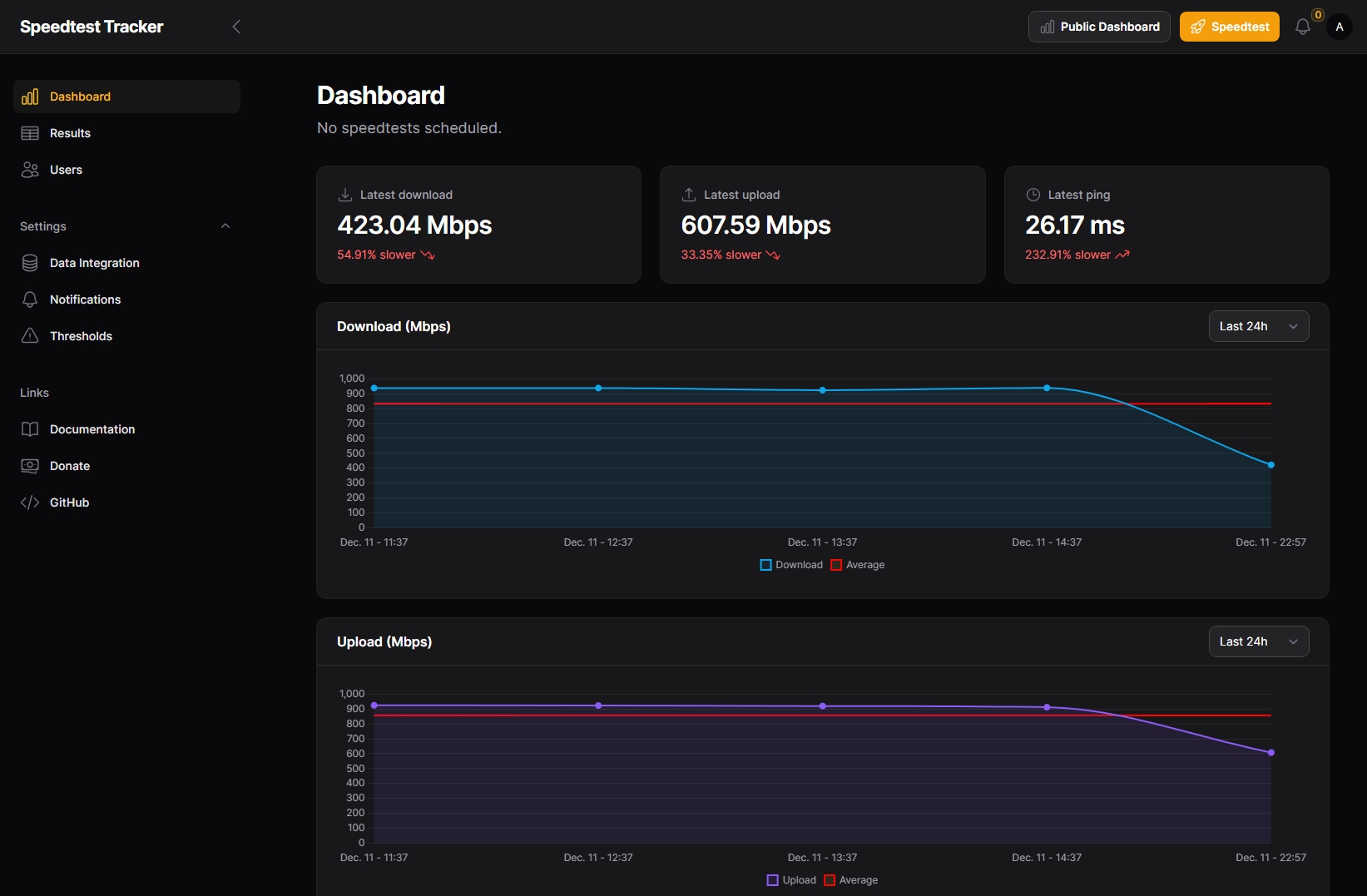
Speedtest Tracker is a free, open source self-hosted internet speed monitoring tool built for homelab users who want a permanent, automated history of their connection performance rather than one-off manual tests. Built on Laravel and powered by the Ookla Speedtest CLI, it runs scheduled speed tests around the clock and stores every result including download speed, upload speed, ping, and jitter in a local database on your own home server. You deploy it via Docker Compose and it immediately starts building the connection history that lets you prove to your ISP exactly when and how often your speeds fall below what you are paying for.
What makes Speedtest Tracker particularly useful in a homelab networking stack is its integrations. It connects natively with Home Assistant, publishing speed results as sensors that you can use in dashboards, automations, and alerts. Results can also be exported to InfluxDB for visualisation in Grafana, making it a natural addition to any homelab observability setup alongside tools like Uptime Kuma or Grafana. You can configure custom alert thresholds so a notification fires the moment your download drops below a set value, with webhook and notification channel support via Apprise covering Telegram, Slack, Discord, email, and more. The scheduled tests run on a configurable cron schedule so you can test every 15 minutes during peak hours or once per hour overnight without any manual intervention.
For homelabbers who pay for a premium broadband tier and want accountability from their ISP, Speedtest Tracker turns a vague feeling that "the internet feels slow" into a documented, timestamped log of actual performance data. Because it is fully self-hosted, all speed test results stay on your own hardware, and the Ookla test data carries the same credibility with ISPs as their own diagnostic tools. It runs on modest hardware including a Raspberry Pi 4 or any low-power mini PC running Docker, drawing minimal resources between scheduled tests.
Key Features
- Automated Ookla Speedtest CLI tests on a configurable cron schedule
- Download speed, upload speed, ping, and jitter history with trend charts
- Home Assistant integration with native sensor publishing
- InfluxDB export for Grafana dashboard visualisation
- Threshold-based speed alerts via Apprise (Telegram, Discord, Slack, email, and more)
- ISP uptime tracking and failed test logging
- Multi-server Ookla server selection and manual test triggering
- Docker Compose deployment with a built-in web dashboard
Use Cases
Speedtest Tracker is ideal for homelabbers who want to document whether their ISP is consistently delivering their advertised speeds, building a timestamped log of Ookla results they can use as evidence when contacting their provider about persistent underperformance. It integrates naturally into a Home Assistant dashboard alongside other network monitoring tools, displaying live download and upload sensor data and triggering automations or notifications when speeds drop below a configured threshold. For anyone already running Grafana and InfluxDB in their homelab, Speedtest Tracker pipes speed test results directly into their existing observability stack with minimal configuration.
Tags:
Resources:
Platforms
Alternative to Speedtest Tracker